
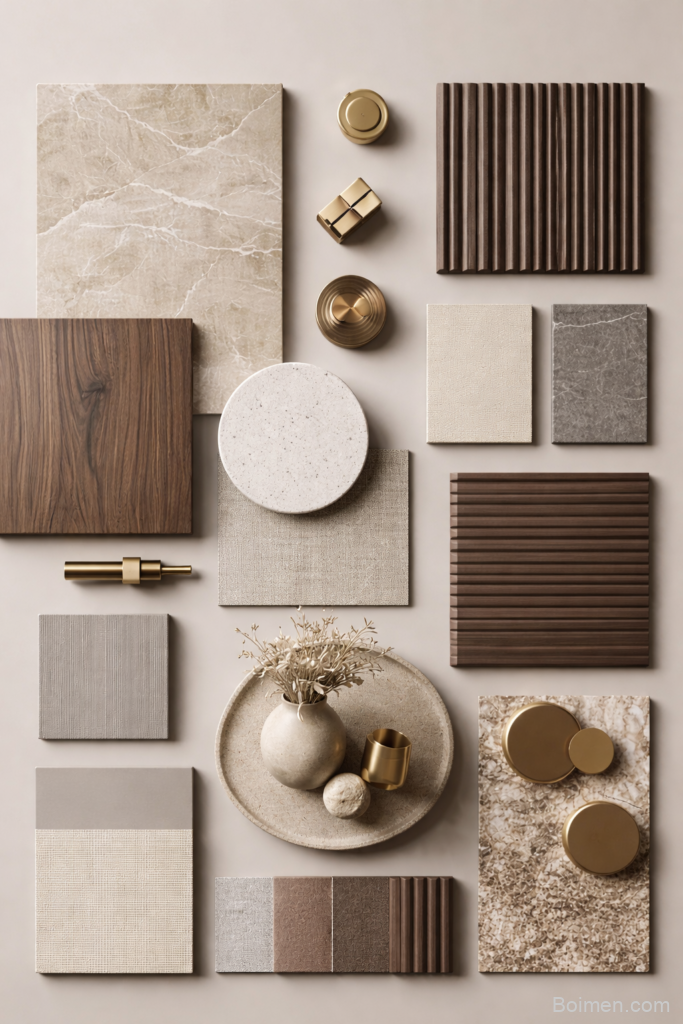
I built my first material moodboard two years ago on our kitchen table, surrounded by paint chips, a scrap of oak leftover from a shelf project, and a small brass hinge I kept because I liked how it caught the light. My husband walked by and asked if I was “making a craft project.” I wasn’t. I was finally figuring out why every room I loved online felt calm and expensive while my own attempts felt busy and a little random.
Advertisements1
The answer, almost every time, was the material story: warm wood, soft stone, brushed brass, and tactile fabric in beige and taupe. When those four pieces repeat across a room in slightly different forms, everything clicks. So I put together 20 resources I actually use to build that exact palette, from free moodboard makers to stone sample libraries and brass hardware shops. Some are well known, most are quietly underrated. Take what helps and skip the rest.
Table of Contents(Click to Toggle)
Why a Neutral Material Moodboard Changes Everything
Here’s what I learned the hard way: picking a paint color is easy. Picking a paint color that works with your floor, your countertop, your cabinet pulls, and your sofa fabric is the actual job. A material moodboard solves that before you spend a dollar.
When I laid out wood, stone, brass, and fabric side by side for our living room, I noticed my original paint choice pulled yellow against the oak and clashed with the warm brass. Five minutes of rearranging saved me a repaint. That’s the whole point: a moodboard is a rehearsal.
You don’t need design school. You need a few good tools, a handful of real samples, and the willingness to move things around until they feel settled. Progress over perfection, always. Here are the 20 resources that make that process faster and honestly kind of fun.
The 20 Resources I Reach For
1. Canva : Free drag-and-drop moodboard builder with ready-made templates
What it is: A browser-based design tool with a dedicated moodboard template library, free to use with a paid tier for premium assets.
Category: Design tool
Why it stands out:
- You can upload your own wood, stone, and brass photos and arrange them in a grid in under ten minutes
- The color palette extractor pulls hex codes straight from your uploaded images, which helped me match a taupe fabric to a stone sample
- Free tier is genuinely usable; the watermark only appears on some premium elements
Best for: Beginners who want a finished-looking board today without learning new software.
2. Milanote : Visual planning boards built for interior projects
What it is: A flexible canvas where you pin images, notes, links, and swatches, then connect them with arrows and columns.
Category: Project planning tool
Why it stands out:
- Its column layout mimics a real flat lay, so I could group “wood” in one column and “stone” in another and see the balance at a glance
- Free plan allows unlimited boards but caps total items, which is plenty for one room
- You can drop in product links with prices to track a budget while you design
Best for: Anyone planning a whole room rather than a single vignette.
3. Savee : A curated image library that feels like a designer’s private stash
What it is: An image-saving and discovery platform popular with architects, stylists, and photographers.
Category: Visual research
Why it stands out:
- The search quality for material close-ups, like “brushed brass detail” or “travertine texture,” is noticeably better than general image search
- Boards are shareable, so I sent one to our contractor and he instantly understood the finish direction
- Free to browse and save; a pro tier adds more storage
Best for: Collecting high-quality reference images before you commit to a palette.
4. Are.na : Ad-free, text-and-image boards for slow, thoughtful collecting
What it is: A minimalist platform where you build “channels” of images, links, and text blocks without an algorithm nudging you.
Category: Visual research
Why it stands out:
- No likes, no ads, no infinite scroll designed to distract, which keeps my palette decisions focused
- You can nest channels, so I keep one master “neutral materials” channel with sub-channels for wood, stone, metal, and textile
- Free accounts allow a generous number of blocks
Best for: People who want a calm, clutter-free research space.
5. Cosmos : A visual discovery app with unusually good material searches
What it is: An image discovery and moodboard app aimed at creative professionals, available on web and mobile.
Category: Visual research
Why it stands out:
- Its recommendation engine clusters visually similar textures, so one tap on a limestone image surfaces ten more stone options
- Boards can be exported as clean image sheets, which I used for a client presentation
- Invite-based historically, but open sign-ups have become more common
Best for: Designers who want discovery and organization in one place.
6. SampleBoard : Digital material boards made specifically for interiors
What it is: A web app that lets you assemble digital sample boards from a built-in library of materials and finishes.
Category: Interior design software
Why it stands out:
- Built-in libraries of wood veneers, stone slabs, and metal finishes mean you don’t have to source every image yourself
- Boards are presentation-ready, with clean labels for each material
- Pricing is aimed at trade users, so it’s a bigger commitment for casual home projects
Best for: Designers presenting to clients or contractors.
7. Morpholio Board : An iPad moodboard app that feels like arranging real samples
What it is: A tablet-first moodboard app from Morpholio with drag, rotate, and layer controls.
Category: Mobile design app
Why it stands out:
- The touch interaction genuinely mimics sliding physical swatches across a table, which changed how I judged proportions
- You can pull product images directly from partner retailer catalogs
- Some features require in-app purchases, but the core board builder is free
Best for: Tablet users who want a tactile, hands-on feel.
8. Material Bank : Order real material samples and get them next day
What it is: A sample-ordering platform that aggregates materials from hundreds of manufacturers into one search.
Category: Material sourcing
Why it stands out:
- You can order multiple samples in a single box, which is how I compared four stone finishes and three wood tones in one afternoon
- Search filters by material type, color family, and finish, so “warm taupe stone” is a real query
- Primarily serves design professionals, and accounts may require trade verification
Best for: Anyone who needs to touch materials before deciding.
9. Sampleism : A curated sample service for finish selection
What it is: A smaller sample-ordering service focused on curated finish collections.
Category: Material sourcing
Why it stands out:
- Curated boxes group finishes that already work together, which is a shortcut when you feel overwhelmed by choice
- Useful for comparing how brass tones read against different beige and taupe backdrops
- Smaller catalog than the big aggregators, so check availability before planning around it
Best for: People who want a curated starting point rather than endless options.
10. Modsy : See your palette rendered in an actual room
What it is: An online interior design service that renders your space with chosen finishes and furniture.
Category: Interior design service
Why it stands out:
- Seeing wood, stone, and brass rendered in your own room’s light is very different from seeing them on a flat board
- You can request revisions if the first pass misses the mark
- It’s a paid service, so treat it as a splurge rather than a first step
Best for: Anyone nervous about committing to a full-room palette.
11. Coolors : Fast palette generation from a single material photo
What it is: A color palette generator with an image-to-palette extraction tool.
Category: Color tool
Why it stands out:
- Upload a photo of your wood floor and it returns a five-color palette you can actually build around
- The contrast checker flags combinations that will look muddy in low light
- Free for basic use with a straightforward interface
Best for: Locking in your beige and taupe range before shopping.
12. Adobe Color : Professional-grade color harmony tools, free in the browser
What it is: Adobe’s color wheel and palette tool, available free on the web.
Category: Color tool
Why it stands out:
- Harmony rules like analogous and monochromatic are perfect for building a layered neutral scheme
- You can extract a theme from an uploaded moodboard image and save it to your library
- Trend exploration panels give a sense of which neutrals are gaining traction
Best for: People who want their neutrals to have real structure, not just vibes.
13. Colour of the Year Archive : Track how neutral palettes evolve year to year
What it is: A reference resource collecting annual color forecasts from major paint and trend authorities.
Category: Trend research
Why it stands out:
- Seeing five years of neutrals side by side shows which tones have staying power versus which are a moment
- Helps you avoid building a room around a shade that will feel dated in two years
- Some trend reports sit behind paywalls, but annual announcements are widely published free
Best for: Long-term thinkers who want timeless over trendy.
14. Unsplash : Free high-resolution texture photography for boards
What it is: A free stock photo library with a strong collection of material and texture close-ups.
Category: Image library
Why it stands out:
- Search “brushed brass texture” or “limestone surface” and you get clean, well-lit images free for personal and commercial use
- No attribution required, which keeps boards uncluttered
- Quality varies by contributor, so filter by orientation and color for consistency
Best for: Filling gaps in a board when you don’t have your own photos yet.
15. Pexels : Another free image source with good fabric and textile shots
What it is: A free stock photo and video site with a large interior and texture catalog.
Category: Image library
Why it stands out:
- Its fabric and drapery photography is stronger than most free libraries, useful for the tactile layer of a board
- Simple licensing with no attribution requirement
- Search results can skew generic, so pair specific terms like “boucle texture” with color filters
Best for: Adding soft textile references to a hard-material palette.
16. Dwell : Real homes that show how neutral materials age
What it is: An architecture and design publication focused on modern residential interiors.
Category: Editorial inspiration
Why it stands out:
- Tour articles often list actual materials and finishes used, which turns inspiration into a shopping list
- You see these palettes in lived-in spaces, not just styled flat lays
- Some content is subscriber-only, but plenty of tours remain free
Best for: Seeing how wood, stone, and brass hold up in real homes.
17. Remodelista : A deep archive of material-driven interiors
What it is: A long-running design site with a searchable archive of interiors, products, and material guides.
Category: Editorial inspiration
Why it stands out:
- Its “10 Easy Pieces” format rounds up hardware and finishes by material, which is exactly how I shop for brass
- The archive is enormous, so older articles still surface great sources
- Affiliate links are common, so compare prices before buying
Best for: Sourcing specific pieces once your palette is set.
18. Schoolhouse : Brass and wood fixtures that photograph beautifully on boards
What it is: A lighting and home goods brand known for simple, well-made fixtures in brass, black, and natural finishes.
Category: Product source
Why it stands out:
- Their product photography uses neutral backdrops, so images drop straight into a moodboard without clashing
- Brass finishes are consistently warm rather than overly yellow, which matters against beige
- Pricing sits in the mid-to-premium range
Best for: Adding a brass focal point that ties a neutral room together.
19. Rejuvenation : Hardware and lighting in aged brass, bronze, and wood
What it is: A home fixtures retailer with a strong hardware and lighting selection in warmer metal finishes.
Category: Product source
Why it stands out:
- Finish names are clearly described, so you know whether a brass is lacquered or living, which changes how it ages
- Cabinet hardware comes in enough sizes to keep a kitchen consistent
- Seasonal sales are frequent, so it pays to wait if you’re not in a hurry
Best for: Kitchens and bathrooms where hardware sets the tone.
20. The Expert : Book a short video consult with a real designer
What it is: A platform for booking paid video consultations with interior designers by the hour.
Category: Design consultation
Why it stands out:
- A 45-minute session gave me honest feedback on whether my taupe and brass pairing was too warm overall
- You can share your moodboard on screen and get live reactions, which beats guessing
- It’s a paid service, but far cheaper than a full design package
Best for: A final sanity check before you buy anything.
Bonus Mentions
Pinterest : Where most of my material boards actually start
Still the fastest way to collect wood, stone, and brass references in one place. Create a secret board per room and pin only images that match your palette. The algorithm learns quickly, but it can pull you off course, so prune ruthlessly.
Houzz : Photo search filtered by material and finish
Its filters let you search by material type, which is rare. Useful when you want to see how a specific stone reads in a real bathroom rather than a studio shot.
ArchDaily : Architecture projects with detailed material specs
Project pages often list exact materials and manufacturers. It’s a technical read, but gold when you want to know what a finish actually is.
Etsy : Small-batch brass and stone pieces you won’t see everywhere
Great for one-off brass hooks, stone trays, and handmade tiles that add character without breaking a neutral palette. Check shop reviews before ordering samples.
Behance : Designer portfolios with full material palettes
Interior and product designers post complete project presentations here, including material boards. It’s a peek at how professionals structure a palette from scratch.
The Quiet Power of a Good Material Story
Here’s what I keep coming back to: a neutral material moodboard isn’t about following a trend. It’s about giving your home a consistent language. Wood warms the space. Stone grounds it. Brass adds a small, deliberate glint. Fabric softens everything so it feels lived in rather than staged.
You don’t need all 20 of these resources. Pick two or three that fit how you actually work, whether that’s a quick Canva board or a box of real samples arriving next week, and start there. My own process was messy for months before it clicked, and that’s completely fine.
Try this week: grab one wood sample, one stone sample, one brass piece, and one fabric swatch you already own, and lay them on a table in daylight. Move them around for five minutes. You’ll learn more from that than from an hour of scrolling.
Which one of these are you trying first, or do you have a favorite material source I missed? Tell me in the comments, I’m always adding to my list.
Here’s to small steps, big impact.

Maya writes about sustainable living and zero-waste swaps for everyday families. She focuses on small, budget-friendly changes that actually stick, tested in her own chaotic kitchen.


Leave a Comment