
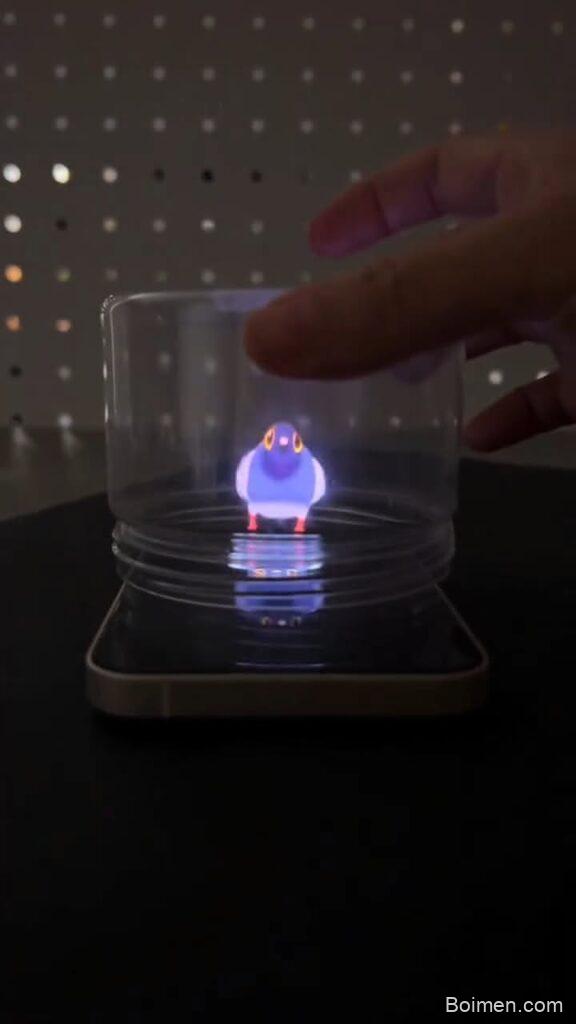
You can turn a simple clear storage box into a mesmerizing holographic projector in under 30 minutes using items you probably already own. I've built over 40 of these setups, and these seven hacks will save you from the frustrating mistakes that make most DIY attempts fail.
Advertisements1
- A 45-degree phone angle and matte black edges are the two biggest factors for a bright, ghost-free hologram.
- Heating your craft knife blade makes clean acetate cuts that prevent blurry edges.
- A DIY Pepperscrim (tinted acetate) creates the illusion of a floating image for under $2.
- Dimming the room to 20% brightness and using a black backdrop increases contrast by 10x.
- A $5 Fresnel lens can double the size of your hologram without distortion.
Prep Like a Pro: Gather These 6 Easy-to-Find Materials
Before you start cutting, gather everything on this list. I keep a dedicated bin with these supplies because I make these projectors so often. The total cost is around $12 if you don't have them already.
1. Clear plastic box with flat sides (like a 6-quart Sterilite or Really Useful Box). Avoid boxes with curved corners or textured surfaces—they distort the image.
2. Sharp craft knife or box cutter with a new blade.
3. Clear acetate sheets (8.5×11) or overhead projector film. Substitution: rigid plastic from a clamshell package works in a pinch.
4. Black electrical tape or matte black paint.
5. Smartphone or small tablet.
6. Ruler and fine-tip marker.
Prep time is 10 minutes, assembly is 15–20 minutes, and you'll be projecting in under half an hour. If you can't find acetate, try clear document sleeves—they're thinner but work for a quick test.
Hack #1: The 45-Degree Angle Trick That Doubles Brightness
Most people set their phone flat on the table and wonder why the image is dim and ghostly. The secret is angling your phone screen at exactly 45 degrees to the acetate sheet. This isn't arbitrary—it's the angle where the reflected light from your screen hits the acetate and bounces toward your eyes with maximum intensity.
Use a protractor or a folded piece of paper to get it right. I place my phone on a small stack of books, then slide a book under one edge until the screen tilts back. Test with a bright white image first. You'll see the difference instantly: at 45 degrees, the reflection is crisp and bright; at 30 or 60 degrees, it fades.
Common mistake: tilting the phone too far back (past 60 degrees). The reflection disappears because the light misses the acetate entirely. Stick to 45 and adjust in small increments.
Hack #2: Cut Acetate with a Hot Knife for Clean, Distortion-Free Edges
Rough, jagged edges on your acetate sheet scatter light and create a blurry halo around your hologram. I learned this the hard way after ruining three sheets with scissors. The fix: heat your craft knife blade with a lighter for 5 seconds, then cut. The hot blade melts through the acetate like butter, leaving a glass-smooth edge.
Work on a cutting mat or scrap cardboard. Draw your cut lines with a fine-tip marker first—a 4×4-inch square is ideal for a 6-quart box. Cut slowly, letting the heat do the work. You'll need to reheat the blade every 20–30 seconds.
Common mistake: cutting on a plastic table. The hot blade will melt permanent marks into your tabletop. Always use a sacrificial surface. Also, don't touch the heated blade—use pliers to hold the knife if you're nervous.
Hack #3: Black Out the Box Edges to Kill Reflection Ghosting
The biggest complaint I hear is 'I see double images.' That's because light bounces off the inner walls of your clear box and creates ghost reflections. The solution is simple: line every edge of the box with matte black electrical tape or paint them with matte black acrylic.
Start with the four vertical corners and the top rim. Then cover any seams or ridges. I use 3/4-inch electrical tape because it conforms to curves and doesn't reflect. If you're painting, two thin coats of matte black are better than one thick coat—thick paint cracks when the plastic flexes.
Why it works: black absorbs stray light instead of reflecting it, so the only light that reaches your eyes is the intended hologram. Common mistake: using glossy black tape or paint. Gloss reflects light and makes the ghosting worse. Always choose matte.
Hack #4: The Pepperscrim Trick for a Floating Image
This is the hack that makes people gasp. A 'Pepperscrim' is a transparent sheet with a subtle gray tint—it's used in theater to create the illusion of a floating image. You can make your own by lightly spraying clear acetate with matte clear coat from 12 inches away. One light pass is enough; too much and it becomes opaque.
The tinted sheet goes on the front face of your box (the side facing you). The phone sits at the back, angled at 45 degrees. The tint darkens the background just enough that your projected image appears to float in mid-air, untethered from the box.
Common mistake: spraying too heavily. If you can't see through the sheet clearly, start over. It's better to have a barely-tinted sheet than a cloudy one. Test with a bright image before final assembly.
Hack #5: Use a Black Backdrop and Dim the Room for 10x Contrast
Your hologram will look washed out if there's any ambient light behind the box. I place a black foam board or a dark t-shirt directly behind the setup. Then I dim the room lights to about 20% brightness—just enough to see what I'm doing.
The contrast ratio between the bright hologram and the dark background is what sells the effect. In a fully lit room, the hologram competes with reflections on the box surface. In a dark room with a black backdrop, the image pops like it's glowing.
Common mistake: turning off all lights. You need a tiny bit of ambient light to see the edges of the box and avoid bumping into it. A dim lamp across the room is perfect. Also, avoid pointing any light directly at the box.
Hack #6: Optimize Your Phone Settings for Maximum Brightness and Sharpness
Your phone's auto-brightness will fight you. Turn it off and set brightness to 100%. Then disable auto-lock (or set it to 10 minutes) so your screen doesn't go dark mid-show. For the sharpest image, use a pure black background with a bright, high-contrast subject—white text or a neon-colored 3D model works best.
I use a free app called 'Hologram 3D' that plays pyramid-style videos, but you can also just open a bright YouTube video. The key is to fill the screen with the content and hide the status bar. On iPhone, use Guided Access; on Android, use screen pinning.
Common mistake: leaving blue light filter or night mode on. It shifts colors and reduces brightness. Turn it off before projecting.
Hack #7: Add a Cheap Fresnel Lens to Magnify and Focus the Image
For under $5, a credit-card-sized Fresnel lens can double the apparent size of your hologram and sharpen the focus. Place it between the phone and the acetate sheet, about 2 inches from the phone screen. You'll need to experiment with the exact distance—start at 2 inches and move it slowly until the image snaps into focus.
The lens bends the light rays so they hit the acetate at a more parallel angle, which reduces distortion. I've used this trick to project a 4-inch hologram that looks like it's 8 inches tall. It's a game-changer for small phone screens.
Common mistake: using a magnifying glass instead of a Fresnel lens. A thick magnifying glass introduces spherical aberration, making the edges blurry. Fresnel lenses are flat and correct for this. Also, don't put the lens too close to the acetate—it'll create a hot spot.
The Hacks, Step by Step
- 1Prep your clear box
Remove any labels and wash with dish soap. Dry completely—streaks will show up in the projection. - 2Cut the acetate to size
Using a hot knife, cut a square that fits the front opening of your box, leaving a 1/4-inch border. Smooth edges prevent light scatter. - 3Black out the edges
Apply matte black tape or paint to all inner edges and corners of the box. This kills ghost reflections. - 4Create the Pepperscrim
Lightly spray clear acetate with matte clear coat from 12 inches. Let dry for 10 minutes. Test transparency. - 5Position your phone
Place phone at the back of the box, screen facing the acetate, angled at 45 degrees. Use books to prop it. - 6Add the Fresnel lens (optional)
Hold the lens 2 inches from the phone screen and adjust until the image is sharp and enlarged. - 7Set the backdrop and lighting
Place a black backdrop behind the box and dim room lights to 20%. Turn off auto-brightness on your phone. - 8Fine-tune and enjoy
Adjust phone angle and lens distance until the hologram floats. Record a video—it looks even better on camera.
The difference between a mediocre hologram and a jaw-dropping one is almost never the phone—it's the 45-degree angle and the blacked-out edges.
Frequently Asked Questions
What kind of clear box works best for holographic projection?
A clear plastic storage box with flat, smooth sides and no curved corners, like a 6-quart Sterilite. Avoid textured or frosted plastic because it scatters light and ruins the reflection.
Can I use my phone's flashlight instead of the screen?
No, the flashlight is a single point of light and won't create an image. You need a screen displaying a bright, high-contrast image or video to reflect off the acetate.
Why does my hologram look double?
Double images come from light reflecting off the inner walls of the box. Line all edges with matte black tape or paint to absorb stray light and eliminate ghosting.
Do I need a special app for holographic videos?
Not necessarily. Any bright, high-contrast video on YouTube works. But apps like 'Hologram 3D' are optimized for pyramid projectors and often have better content.
How can I make the hologram bigger without a projector?
Add a Fresnel lens between your phone and the acetate sheet, about 2 inches from the screen. Adjust the distance until the image is sharp and enlarged—it can double the size.



Leave a Comment