
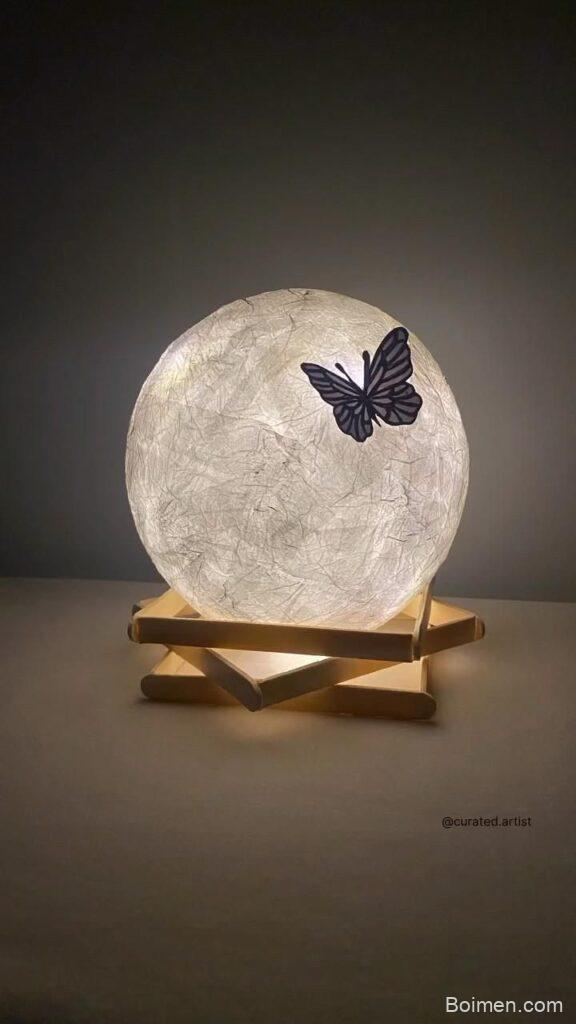
Most DIY moon lights look store-bought because crafters skip the two details that create realism: surface texture and light diffusion. Here's a quick win: rub a 220-grit sandpaper lightly over your moon's surface before painting—it mimics lunar craters and makes the light scatter naturally. In the next seven hacks, you'll learn specific techniques, tool comparisons, and common pitfalls to avoid.
Advertisements1
- Texture is key: sanding and dry-brushing create realistic crater shadows.
- Use 2700K–3000K warm white LEDs for a cozy, realistic glow.
- A baking paper diffuser eliminates hotspots and softens light.
- Mount on a clear acrylic rod for a floating effect.
- Add a dimmer and timer for practical, energy-efficient use.
- Personalize with constellation drilling—stay 1cm from edges to avoid cracks.
Hack 1: Use a 3D-Printed or Papier-Mâché Base for Realistic Craters
A flat wooden disc or foam ball won't cut it. For authentic lunar topography, start with a 3D-printed moon model (free STL files from NASA's Lunar Reconnaissance Orbiter data) or build a papier-mâché base using a balloon and strips of newspaper dipped in a 1:1 flour-water paste. Layer 4–6 strips, letting each dry for 2 hours. Then, press small indentations with a rounded pencil eraser to mimic craters—vary sizes from 2mm to 15mm. This works because real moon craters have raised rims and concave centers; your indentations create the same light-and-shadow play when backlit. Common mistake: using too much paste, which causes mold and cracks as it dries. Aim for a thin, even coat.
Hack 2: Choose the Right LED: Warm White vs. Cool White vs. RGB
The LED you pick determines whether your moon looks like a cozy nightlight or a sci-fi prop. For a realistic moon, use a 2700K–3000K warm white LED strip (e.g., 12V 5050 SMD) because the moon's surface reflects sunlight at approximately 5800K, but backlit decor benefits from a softer, warmer glow to avoid harsh blue tones. RGB LEDs are fun for color-changing effects but can wash out crater details. If you want adjustable brightness, use a dimmable LED driver with a remote. Comparison: • 2700K–3000K: warm, cozy, best for bedrooms. • 4000K–5000K: neutral, good for modern decor. • RGB: versatile but less realistic. Common mistake: overloading the circuit—check that your power supply matches the LED strip's wattage (e.g., 5m of 5050 strip draws ~72W, so use a 12V 10A adapter).
Hack 3: Create a Diffuser Layer with Baking Paper or Frosted Acrylic
Bare LEDs create hotspots that ruin the illusion. Add a diffuser: cut a circle of baking paper (parchment) and glue it 1–2 cm behind the moon's surface, or use a 2mm frosted acrylic sheet. This scatters light evenly, mimicking the moon's soft glow. Why it works: the diffuser increases the light's path length and randomizes photon direction, reducing glare. For a 20cm moon, a single layer of 40gsm baking paper is enough; for larger, use two layers. Common mistake: using clear plastic wrap, which doesn't diffuse and can melt near hot LEDs. Always test with the LED on for 10 minutes to check for heat buildup.
Hack 4: Paint with Acrylics and a Dry-Brush Technique for Texture
Base coat with a mix of titanium white and a touch of burnt umber (ratio 10:1) to create a warm off-white. Let dry. Then, dry-brush: dip a flat brush in unthinned gray acrylic, wipe off most paint on a paper towel, and lightly drag across the surface. This highlights crater rims and creates depth. For extra realism, stipple dark gray (mix black and white) into crater centers with a sponge. Why it works: dry-brushing deposits pigment only on raised areas, mimicking how sunlight catches crater edges. Common mistake: using too much paint—start with less and build up. Seal with matte varnish to prevent chipping.
Hack 5: Mount with a Floating Effect Using a Hidden Base
To make your moon appear to float, use a 3D-printed or laser-cut acrylic stand that holds the moon from the bottom, or suspend it with fishing line from a ceiling hook. For a tabletop version, drill a 5mm hole in the bottom of the moon and insert a 10cm clear acrylic rod attached to a wooden base. This works because the clear rod disappears against most backgrounds, creating a levitation illusion. Common mistake: using a thick, visible stand that distracts from the moon. Also, ensure the rod is sturdy enough—a 20cm moon weighs about 300g, so use a 6mm rod for stability.
Hack 6: Add a Remote-Controlled Dimmer and Timer for Practicality
A moon light is decor, but it should also be functional. Solder a 12V dimmer module (e.g., PWM dimmer) between the LED strip and power supply, and house it in a small project box. Pair with a remote control outlet timer (like a simple plug-in timer) to automate on/off. Why it works: dimming extends LED lifespan and lets you adjust ambiance from bright to a soft nightlight. Common mistake: using a dimmer rated for lower amperage than your LED draw—check the specs (e.g., 8A dimmer for a 5A load). Also, avoid placing the dimmer inside the moon where heat can accumulate.
Hack 7: Personalize with Constellation Drilling or Etched Phases
Drill small holes (1–2mm) in a pattern of your favorite constellation using a hand drill with a 1.5mm bit. Place the LED behind so light shines through the holes. Alternatively, use a wood-burning tool to etch moon phases around the equator. This adds a personal touch and makes the piece unique. Why it works: the drilled holes create sharp points of light that contrast with the diffused glow, drawing the eye. Common mistake: drilling too close to the edge, which can crack the material. Stay at least 1cm away from edges and drill slowly.
The Hacks, Step by Step
- 1Gather Materials
Collect a 3D-printed or papier-mâché moon base (15–20cm diameter), 12V warm white LED strip, 12V power adapter, dimmer, baking paper, acrylic paints (titanium white, burnt umber, gray), brushes, sandpaper (220-grit), and a clear acrylic rod for mounting. - 2Prepare the Surface
Sand the moon base lightly with 220-grit sandpaper to create texture. Wipe off dust. If using papier-mâché, ensure it's completely dry (at least 24 hours). - 3Install the LED and Diffuser
Adhere the LED strip in a spiral pattern on the back of the moon, leaving 2cm gap from edges. Connect to power adapter and test. Cut a circle of baking paper slightly smaller than the moon's diameter and glue it 1–2cm behind the front surface. - 4Paint and Texture
Apply a base coat of mixed white and burnt umber. Let dry. Dry-brush gray on crater rims, then stipple dark gray in centers. Seal with matte varnish. - 5Add Personal Touches
Drill constellation holes or etch moon phases. Use a 1.5mm drill bit, drilling slowly and staying 1cm from edges. - 6Mount and Finalize
Attach the moon to a clear acrylic rod fixed to a wooden base, or suspend with fishing line. Connect the dimmer and timer. Test all functions and adjust brightness.
The difference between a craft-store moon and a realistic DIY moon light comes down to two things: surface texture that catches light, and a diffuser that softens it.
Frequently Asked Questions
What is the best material for a DIY moon light?
Papier-mâché or 3D-printed PLA are best because they accept paint and hold crater details. Papier-mâché is cheap and easy; 3D printing offers precision if you have access to a printer.
How do I make my moon light look realistic?
Focus on texture and lighting: sand the surface, dry-brush gray paint on crater rims, and use a warm white LED with a diffuser. Avoid cool white LEDs, which look artificial.
Can I use fairy lights instead of LED strips?
Yes, but fairy lights create uneven hotspots and may not be bright enough. If using them, double up on diffuser layers and choose warm white.
How do I hang a moon light without visible cords?
Use a clear acrylic rod for tabletop or fishing line for hanging. Run the power cord along the rod or use a battery pack hidden in the base.
Is it safe to leave a DIY moon light on all night?
Yes, if you use a low-voltage LED (12V) and ensure proper ventilation. Avoid enclosing the power supply; use a timer to limit continuous use.



Leave a Comment