
Your Pinterest image is the first—and often only—chance to earn a click. In this guide, I'm sharing the exact dimensions, design principles, and text strategies I use to create pins that stand out and drive traffic. Let's get your pins noticed!
Advertisements1
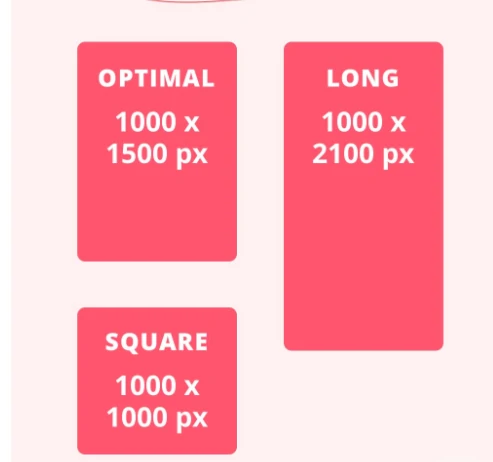
- Use 1000 x 1500 pixels (2:3 ratio) for all pins.
- Text overlay should be 3-5 words, placed in the upper third.
- Original images outperform stock photos for engagement.
- Include keywords in title, description, and alt text.
- Video pins (under 15 seconds) can boost reach significantly.
- A/B test your pin designs to learn what your audience loves.
Start with the Right Dimensions
Remember that Pinterest is a visual search engine, so clarity is key. A busy or cluttered image will lose the viewer's attention in a split second. Keep your design clean, with one focal point, and let the image breathe. I like to use a solid or gradient background to make text pop.
Design for Skimmers: Text Overlay That Works
Don't rely solely on text overlay—ensure the image itself tells the story. If it's a recipe, show a close-up of the finished dish. If it's a DIY, show the before and after. The combination of a compelling image and clear text overlay is what stops the scroll.
Use High-Quality, Original Images
Also, consider creating multiple pin designs for the same piece of content. Pinterest rewards fresh pins, so I often create 2-3 variations with different images or text overlays. This lets me test what resonates and keeps my content from going stale.
Optimize the Pin Title and Description
I also make sure to include keywords in the image file name (e.g., '15-minute-pasta-recipe.jpg') and in the alt text. This reinforces the topic for search engines and Pinterest's algorithm.
Leverage Video Pins for Even More Reach
Remember to add captions or text overlays to your video, as many users watch without sound. And keep the file size manageable—compress videos to under 100MB to ensure fast loading.
A/B Test Your Pins to See What Works
Testing also helps you refresh old content. If a pin is underperforming, create a new version and see if it does better. This is a continuous improvement process that keeps your content fresh and engaging.
Keep Accessibility in Mind
Making your pins accessible not only helps users with visual impairments but also improves your SEO. Use high-contrast text and background, and ensure your text overlay is legible even on small screens. I also add alt text to every pin image, describing what's in the image and including relevant keywords.
Pinterest also supports screen readers, so a good alt text description is essential. For example, 'A person holding a bowl of 15-minute pasta with fresh basil on top.' This not only improves accessibility but also helps Pinterest understand your image content.
How to Do It, Step by Step
- 1Set the right dimensions
Create your pin at 1000 x 1500 pixels (2:3 ratio). This ensures your pin displays well on all devices and takes up prime real estate in the feed. - 2Design a clean layout
Use a simple background, one focal point, and a bold, readable font. Keep text overlay to 3-5 words and place it in the upper third to avoid being covered by metadata. - 3Use high-quality images
Take original photos or customize stock photos. Ensure the image is sharp and visually appealing, as this builds trust and stops the scroll. - 4Write a keyword-rich title and description
Include your primary keyword naturally in the title and description. Add a call-to-action and a few relevant hashtags to improve discoverability. - 5Add alt text
Write a descriptive alt text for your pin image, including relevant keywords. This improves accessibility and helps Pinterest understand your content. - 6Consider video pins
Create a short, loopable video (under 15 seconds) that shows a quick tip or process. Video pins often get higher engagement. - 7Test different designs
Create multiple pin variations and track their performance in Pinterest Analytics. Use the data to refine your design strategy. - 8Refresh old pins
Update underperforming pins with new designs or text. This can give them a second chance at visibility.
Your pin is a promise of value—make it clear, make it beautiful, and make it impossible to ignore.
Frequently Asked Questions
What is the best size for a Pinterest pin?
The best size is 1000 x 1500 pixels, a 2:3 ratio. This vertical format is optimized for the feed and mobile viewing.
How many words should be on a Pinterest image?
Keep text overlay to 3-5 words. This ensures readability at a glance and avoids cluttering the image.
Should I use text overlay on Pinterest images?
Yes, text overlay can increase clicks by clarifying the content. Use a bold, readable font and place it in the upper third.
How do I make my Pinterest pins stand out?
Use high-quality, original images, a clean design, and a clear call-to-action. Test different styles to see what resonates with your audience.
Can I use stock photos on Pinterest?
Yes, but customize them with text overlays or graphics to make them unique. Original photos tend to perform better.

Elena focuses on healthy cooking and meal prep for people with limited time and budget. She shares flexible recipes and shortcuts that don’t sacrifice flavor.


Leave a Comment