
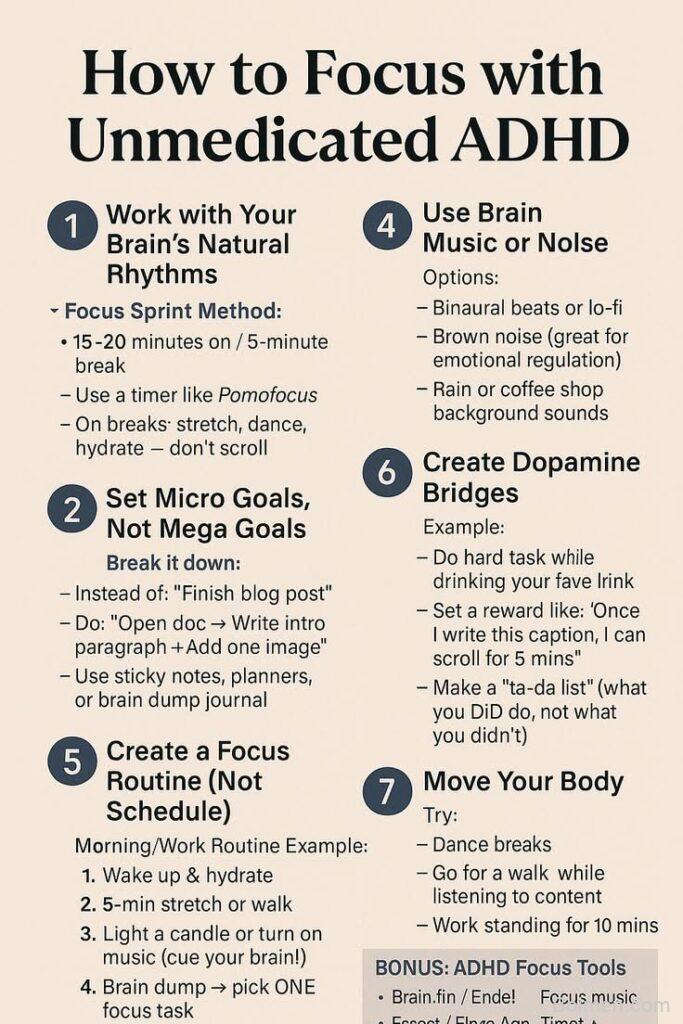
Picture this: it’s 2 p.m., you’ve opened the same document four times, and your brain has decided that reorganizing your spice rack is the most urgent task on Earth. Sound familiar? ADHD focus isn’t about willpower — it’s about finding the right scaffolding. The apps and sites below are the digital equivalent of a friend gently tapping your shoulder and saying, “Hey, one thing at a time.” Some use timers, some use sound, some use tiny cartoon creatures that guilt-trip you into finishing your taxes. All of them are worth a try, and none of them require you to be a productivity guru. Grab a snack, pick one, and let’s make today slightly less chaotic.
Advertisements1
Table of Contents(Click to Toggle)
Why ADHD Brains Need External Focus Tools
ADHD isn’t a deficit of attention — it’s a surplus of it, pointed in seventeen directions at once. The problem isn’t that you can’t focus; it’s that your brain struggles to decide what to focus on, and then keeps second-guessing the decision. That’s why external tools help so much. A timer becomes the referee. A body double becomes the co-pilot. A soundscape becomes the walls of a quiet room you can carry in your pocket. These tools don’t fix your brain — they work with it, turning abstract intentions into something visible, audible, or social. Think of them as training wheels that never make you feel embarrassed for needing them.
18 Focus Tools for ADHD Brains
1. Focusmate : Virtual body doubling that makes you show up
What it is: A platform that pairs you with a stranger for a 25, 50, or 75-minute silent work session over video.
Category: Body doubling / accountability
Why it stands out: ADHD brains often can’t start tasks alone, but can start instantly when someone else is watching. Focusmate turns that social pressure into a scheduled appointment. You state your goal at the start, work silently, then check in at the end. The free tier gives you three sessions a week; unlimited sessions cost about $10/month.
Best for: Anyone who has ever cleaned their entire kitchen to avoid writing one email.
2. Forest : Grow a tree by staying off your phone
What it is: A focus timer where planting a virtual tree means committing to a set period away from your phone.
Category: Gamified focus
Why it stands out: If you leave the app, your tree wilts — and that tiny loss feels surprisingly painful. Forest also partners with a real tree-planting organization, so your focus sessions contribute to actual forests. The visual feedback is immediate and satisfying, which is exactly what ADHD brains crave.
Best for: People who need a tangible reward for something as invisible as “not touching your phone.”
3. Cold Turkey : The blocker that refuses to negotiate
What it is: A website and app blocker for Windows and Mac that can lock you out of distracting sites for set periods.
Category: Distraction blocking
Why it stands out: Unlike browser extensions you can disable in two clicks, Cold Turkey has a “Frozen Turkey” mode that makes blocks nearly impossible to bypass until the timer ends. You can block entire categories, schedule recurring blocks, and even block specific apps. It’s the strict friend you need when your willpower is running on fumes.
Best for: Chronic tab-hoppers who need a hard boundary, not a gentle suggestion.
4. Freedom : Block distractions across all your devices at once
What it is: A cross-platform blocker that syncs your focus sessions between phone, tablet, and computer.
Category: Distraction blocking
Why it stands out: Most blockers only handle one device. Freedom blocks sites and apps everywhere simultaneously, so you can’t just switch to your phone when your laptop is locked down. You can schedule sessions in advance, which removes the in-the-moment decision fatigue that trips up ADHD brains.
Best for: People who own three devices and use all of them to procrastinate.
5. Brain.fm : Music engineered to help you concentrate
What it is: A music service that uses AI-generated audio designed to influence brain activity for focus, relaxation, or sleep.
Category: Focus soundscapes
Why it stands out: Unlike regular playlists, Brain.fm’s tracks include rhythmic modulations that the company says are designed to help sustain attention. Many users with ADHD report it helps quiet the mental chatter that makes reading a paragraph feel like climbing a hill. There’s a free trial, and sessions run in 30-minute, 60-minute, or 2-hour blocks.
Best for: Anyone who can’t work in silence but gets distracted by lyrics.
6. Endel : Adaptive soundscapes that respond to your day
What it is: An app that generates personalized sound environments based on your time of day, weather, and heart rate.
Category: Focus soundscapes
Why it stands out: Endel doesn’t play the same loop over and over — it shifts subtly, which keeps your brain from tuning it out. It syncs with Apple Health and wearables to adapt in real time. The “Focus” mode is designed for deep work, while “Recovery” helps you decompress without doomscrolling.
Best for: People who find static white noise boring within five minutes.
7. Noisli : Mix your own background noise in seconds
What it is: A simple web tool that lets you layer sounds like rain, wind, thunder, and coffee shop chatter.
Category: Focus soundscapes
Why it stands out: Noisli is refreshingly low-commitment — open the site, click a few sound icons, and you’re done. You can save your favorite mixes and even use a built-in text editor with color highlighting. It’s free for basic use, and the browser version means there’s nothing to install.
Best for: Quick focus sessions when you don’t want to sign up for anything.
8. Pomofocus : A clean Pomodoro timer that just works
What it is: A free, browser-based Pomodoro timer with task lists and session tracking.
Category: Timeboxing
Why it stands out: The Pomodoro Technique — 25 minutes of work, 5 minutes of rest — is practically designed for ADHD brains because it makes tasks feel temporary. Pomofocus keeps the interface minimal, so you don’t spend 20 minutes customizing settings instead of working. You can add tasks, estimate how many pomodoros each will take, and see your daily report.
Best for: People who need to trick themselves into starting by promising a break soon.
9. Focus To-Do : Pomodoro plus task management in one app
What it is: An app for iOS, Android, Windows, and Mac that combines a Pomodoro timer with to-do lists and habit tracking.
Category: Timeboxing + task management
Why it stands out: If you like the Pomodoro method but keep losing your task list in another app, Focus To-Do merges both. It syncs across devices, offers detailed statistics, and includes a white-noise player. The interface is friendly without being childish, and the free version is genuinely usable.
Best for: People who want one app instead of three.
10. Habitica : Turn your to-do list into a role-playing game
What it is: A habit tracker that gamifies your tasks — you earn experience points and gold for completing real-life chores.
Category: Gamified productivity
Why it stands out: Habitica turns “do the dishes” into a quest. You create a character, join parties with friends, and fight monsters by checking off tasks. For ADHD brains that thrive on novelty and reward, this can be the difference between a boring list and a game you actually want to play. The mobile and web apps are free, with optional subscriptions for extras.
Best for: Gamers and anyone who needs a dopamine hit to fold laundry.
11. Finch : A tiny bird that grows as you care for yourself
What it is: A self-care app where you raise a virtual pet by completing daily goals and reflections.
Category: Gentle habit building
Why it stands out: Finch is less about productivity and more about emotional scaffolding. Your bird checks in on you, you set small goals, and completing them helps your bird grow. It’s especially good for days when “be kind to yourself” is the only goal you can manage. The app is free with optional in-app purchases.
Best for: Anyone who needs a softer, less judgmental nudge.
12. Sunsama : A daily planner that forces realistic scheduling
What it is: A calendar-integrated planner that helps you plan your day with realistic time estimates.
Category: Daily planning
Why it stands out: ADHD time blindness makes it easy to schedule 14 hours of work into an 8-hour day. Sunsama pulls in your calendar and tasks, then shows you exactly how much time you actually have. Its daily shutdown ritual helps you review what got done without shame. It’s a paid tool (around $20/month), but the structure is worth it for chronic over-schedulers.
Best for: People who consistently plan more than they can do.
13. Amazing Marvin : A to-do app you can shape to your brain
What it is: A highly customizable task manager with strategies designed for different productivity styles.
Category: Task management
Why it stands out: Most task apps force you into one workflow. Marvin lets you toggle features on and off — time-blocking, reward systems, procrastination busters — so you can build a system that matches how your brain actually works. It’s especially useful for ADHD users who need novelty and flexibility without losing their data.
Best for: Tinkerers who have abandoned five other task apps.
14. Tiimo : A visual planner built with neurodivergent users
What it is: A visual daily planner app designed with input from neurodivergent people, using icons and colors instead of dense text.
Category: Visual planning
Why it stands out: Tiimo shows your day as a colorful timeline, which makes time more concrete. It includes focus timers, routine builders, and gentle reminders. The design is calm and uncluttered, avoiding the visual overwhelm that makes many planners unusable. It’s available on iOS, Android, and web, with a free trial and subscription.
Best for: Visual thinkers who glaze over at text-heavy calendars.
15. Goblin Tools : Break overwhelming tasks into tiny steps
What it is: A free collection of small AI-powered tools, including a “Magic ToDo” that breaks tasks into manageable subtasks.
Category: Task breakdown
Why it stands out: Executive dysfunction often means you know what to do but not where to start. Goblin Tools takes a task like “clean the kitchen” and splits it into steps you can actually begin. It also has a tone analyzer, a formalizer for emails, and a judge tool for estimating task difficulty. It’s free, ad-free, and made by a neurodivergent developer.
Best for: Anyone who has stared at a task for 20 minutes without starting.
16. Saner.ai : An AI assistant that keeps your thoughts in one place
What it is: A note-taking and task app that uses AI to organize scattered thoughts and to-dos.
Category: AI organization
Why it stands out: If your brain feels like 47 open tabs, Saner.ai is a place to dump everything and let AI sort it. You can capture notes, tasks, and ideas, then ask the assistant to summarize or prioritize. It’s especially helpful for ADHD users who struggle with traditional note apps that require constant manual filing.
Best for: People whose best ideas arrive at inconvenient times.
17. RescueTime : See exactly where your hours went
What it is: An automatic time-tracking tool that categorizes how you spend time on your devices.
Category: Time awareness
Why it stands out: ADHD time blindness means hours can vanish without a trace. RescueTime runs in the background and shows you a report of your day — no manual timers needed. You can set goals, block distracting sites, and receive a weekly email summary. The premium version adds focus sessions and alerts. It’s a reality check, not a guilt trip.
Best for: Anyone who genuinely doesn’t know where the afternoon went.
18. Focus Bear : A habit and focus app designed for ADHD and autism
What it is: An app that guides you through routines, blocks distractions, and prompts breaks.
Category: Routine + focus
Why it stands out: Focus Bear was built specifically for neurodivergent users. It walks you through morning and evening routines step by step, blocks distracting apps during focus sessions, and reminds you to take breaks and move your body. It’s available on Windows, Mac, iOS, and Android, with a free trial and subscription.
Best for: People who need help with routines as much as with focus.
Bonus Mentions
Forest : The classic tree-growing timer also has a Chrome extension
If you love the mobile app, the browser extension blocks distracting sites while you grow your virtual forest. It’s a nice bridge between phone and desktop focus.
Todoist : A flexible to-do list with natural language input
Todoist isn’t ADHD-specific, but its quick-add feature (“pay rent tomorrow at 9am”) and cross-platform sync make it a solid home base for tasks. Pair it with a Pomodoro timer for best results.
Notion : Build your own focus dashboard
Notion can be as simple or as complex as you want. Many ADHD users create a single “today” page with a timer, task list, and notes. Just beware the rabbit hole of template customization.
Calm : Short meditations for resetting between tasks
Sometimes the focus problem is really an anxiety problem. Calm’s short breathing exercises can help you transition between tasks without spiraling.
Spotify : Lo-fi and brown noise playlists for cheap
If you don’t want another subscription, Spotify has countless ADHD-friendly focus playlists, from lo-fi beats to brown noise. Search “ADHD focus” and hit shuffle.
Your Turn: Pick One and Start Messy
You don’t need all 18 of these tools. In fact, downloading all of them would be a very ADHD thing to do — and then you’d spend three hours organizing your new productivity system instead of doing the thing you opened your laptop for. So here’s my challenge: pick one tool from this list, try it for a single focus session today, and let it be imperfect. Maybe Focusmate’s video feels awkward the first time. Maybe your Forest tree dies because you checked Instagram. That’s fine. Messy first drafts are how everything starts — including better focus habits.
Which tool are you trying first? Tell me in the comments, and if you have a hidden gem I missed, share it — I’m always collecting new ones.
Keep your pen dancing.

Priya explores creative writing prompts and storytelling techniques for aspiring authors. She shares exercises to spark imagination and build narrative confidence, drawn from her own writing practice.


Leave a Comment