
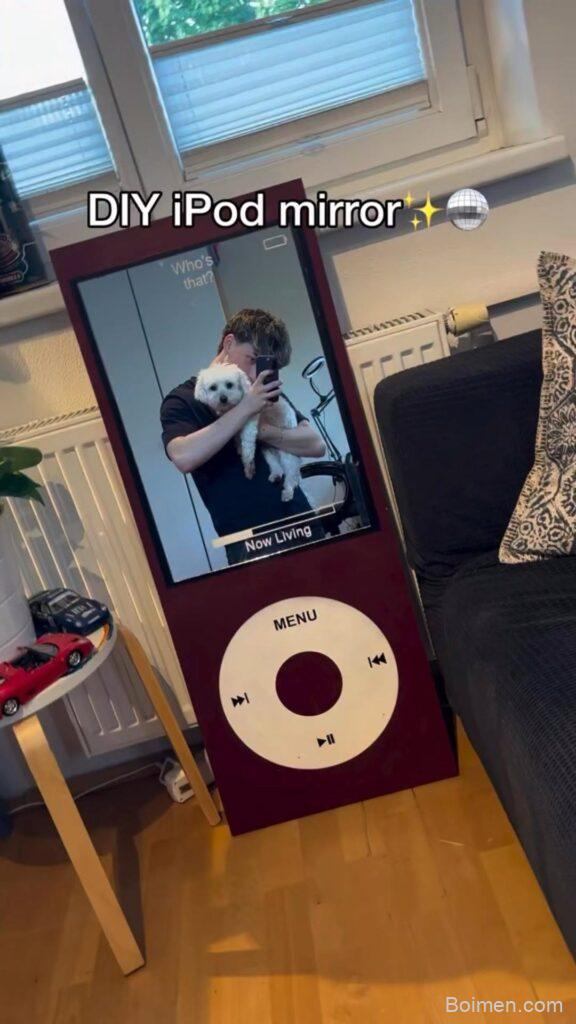
Got an old iPod collecting dust? Turn it into a chic mirror that's both functional and nostalgic. This DIY project takes under an hour and costs less than $10. Let's give your iPod a second life!
Advertisements1
- Use a classic iPod with a flat screen for best results.
- Acrylic mirror sheets are safer and easier to cut than glass.
- Sand mirror edges to prevent cuts and ensure a smooth finish.
- A thin line of adhesive is enough—too much makes a mess.
- Let the adhesive cure fully before using the mirror.
Why an iPod Mirror?
An iPod mirror is a fun way to repurpose outdated tech. The classic iPod design is iconic, and turning it into a mirror adds a touch of retro charm to your space. Plus, it's a conversation starter. You'll need just a few supplies: an old iPod, a mirror sheet, and some basic tools. In this guide, I'll walk you through the process step by step, sharing tips I've learned from making dozens of these.
Choosing the Right iPod
Not all iPods are created equal for this project. The best candidates are the Classic models with a flat front, like the 5th or 6th generation. Their large screen area makes for a good mirror size. Avoid iPod Touches with curved edges, as they're harder to work with. If you don't have an old iPod, you can find them cheaply at thrift stores or online marketplaces for $10-$20.
Gathering Your Tools and Materials
You'll need a few things: a small mirror sheet (I recommend 2mm thick acrylic mirror, available at craft stores), a craft knife or scissors, fine-grit sandpaper (400-600 grit), a cleaning cloth, and strong adhesive like E6000 or double-sided foam tape. Also, a screwdriver set for disassembly if you plan to remove the screen. Total cost: around $8 if you already have the iPod.
Step-by-Step: Disassembling the iPod
First, power off your iPod and remove any cases or screen protectors. Use a plastic opening tool or guitar pick to gently pry open the case. Work slowly to avoid cracking the plastic. Once open, disconnect the battery and remove the screen assembly. This step is optional—you can also just cover the existing screen with mirror. But removing the screen gives a cleaner look. Set aside screws in a small container so you don't lose them.
Cutting and Attaching the Mirror
Measure the screen opening and cut your mirror sheet to size. It's better to cut slightly larger and sand down the edges for a perfect fit. Sand the edges with fine-grit sandpaper to smooth them and prevent injury. Clean the mirror and the iPod surface with a lint-free cloth. Apply a thin line of adhesive around the screen bezel, then carefully place the mirror. Press gently and let it cure for 24 hours. Avoid using too much glue—it can seep onto the mirror and ruin the reflection.
Finishing Touches and Display Ideas
Once the adhesive is dry, you can add a pop of color by painting the back casing or adding washi tape. For a stand, use a small easel or attach a kickstand. Place your new mirror on a vanity, desk, or entryway table. It's perfect for quick touch-ups. You can also add a small magnet to the back to stick it on your fridge. Get creative!
Common Mistakes to Avoid
One big mistake is using too much adhesive, which can ooze out and make a mess. Another is not sanding the mirror edges, leaving them sharp. Also, don't skip cleaning the surfaces—dust and oil will prevent a strong bond. And be careful when prying open the iPod; forcing it can crack the casing. If you're not comfortable disassembling, you can simply cut the mirror to fit over the screen without opening the iPod.
The Hacks, Step by Step
- 1Power off and clean your iPod
Turn off the iPod and wipe it down with a microfiber cloth to remove any dirt or oil. This ensures a clean surface for adhesion. - 2Open the iPod case
Use a plastic opening tool to gently pry the front panel from the back. Work around the edges slowly to avoid breaking the clips. - 3Remove the screen
Disconnect the screen ribbon cable and lift out the screen. This step is optional but gives a more authentic mirror look. Keep screws organized. - 4Measure and cut the mirror
Place the mirror sheet over the screen opening and trace the shape. Cut with a craft knife, then sand the edges smooth. - 5Attach the mirror
Apply a thin bead of adhesive around the screen bezel. Press the mirror into place and hold for a minute. Let it cure for 24 hours. - 6Reassemble and decorate
Once dry, snap the case back together. Add decorations like paint or stickers to personalize your mirror.
Turning an old iPod into a mirror is a small project with a big impact—it's a reminder that even outdated tech can find new life.
Frequently Asked Questions
Can I use any iPod model?
The classic iPod with a flat screen works best. iPod Touches with curved screens are harder to fit with a mirror.
Where can I buy a small mirror sheet?
Craft stores like Michaels or online retailers sell acrylic mirror sheets. You can also repurpose a compact mirror.
Do I need to remove the screen?
No, you can simply cover the screen with mirror. Removing it gives a cleaner look but is optional.
How long does the adhesive take to dry?
Most adhesives like E6000 take 24 hours to fully cure. Check the product instructions.
Will the mirror be functional?
Yes, it's a real mirror! Just make sure the surface is clean and smooth for a clear reflection.



Leave a Comment