
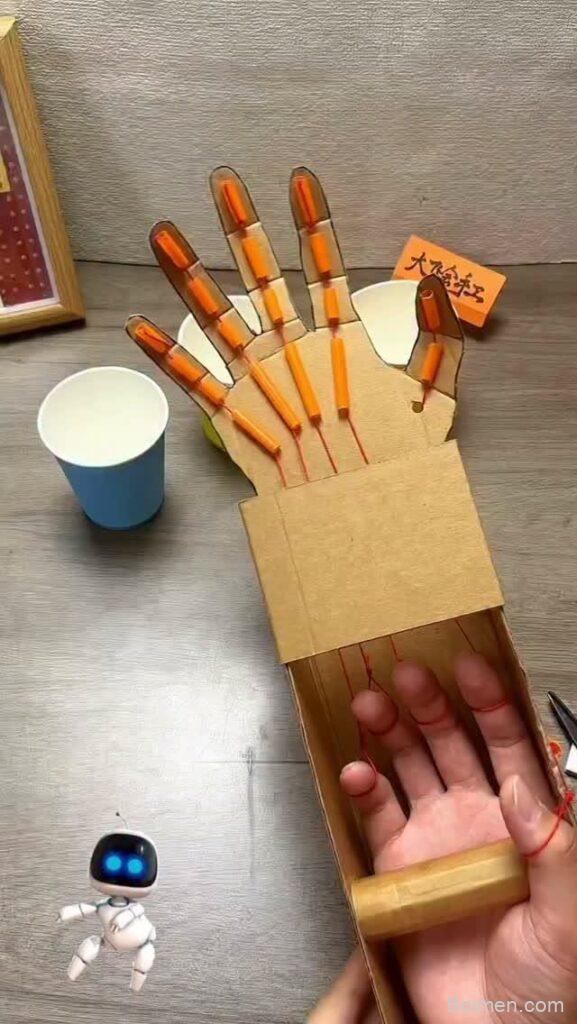
Picture this: a rainy Saturday, a mountain of delivery boxes by the door, and a kid who has already announced they are bored. Now picture that same kid twenty minutes later, eyes wide, lifting a cereal box with a cardboard claw they built themselves. That is the small, wonderful magic of a DIY robotic arm — a project that turns trash into a moving, grippy machine.
Advertisements1
Cardboard robotics is the friendliest doorway into STEM for kids because the stakes are low and the mistakes are cheap. If the arm flops, you cut another hole. If the string snaps, you tie it again. Below are sixteen cardboard robotic arm builds and resources, from paper-simple to genuinely clever, plus a few bonus mentions for the tinkerers who want to go further.
Table of Contents(Click to Toggle)
Why a Cardboard Robotic Arm Is the Best First Robot
Think of a cardboard robotic arm like a paper airplane for engineering. Nobody expects it to fly across the Atlantic. That is exactly why it works. The materials are free, the failure is painless, and the child is suddenly the boss of a machine that moves because they made it move.
There is real science hiding in that floppy claw. A simple string-and-syringe arm teaches hydraulics. A lever-and-pivot arm teaches torque and fulcrums. A motorized version sneaks in circuits, polarity, and the idea that a switch is just a drawbridge for electricity. Kids absorb all of it because their hands are busy and their goal is concrete: grab the toy, stack the cup, win the game.
The best part is the mess. Glue drips. Straws bend wrong. The first claw always drops the ball. That messy first draft is not a failure — it is the whole point, and it is where the good ideas get born.
Below are sixteen places to find instructions, kits, simulators, and inspiration for cardboard robotic arms. Some are step-by-step builds, some are design tools, and some are communities where your kid can show off the wobbling masterpiece.
16 Cardboard Robotic Arm Projects and Resources
1. Science Buddies : Free step-by-step robotics builds for kids
What it is: A nonprofit library of hands-on science and engineering projects, including several robotic arm builds using cardboard, syringes, and craft materials.
Category: Project instructions and lesson plans
Why it stands out: Each project comes with a clear materials list, a difficulty rating, and a short explanation of the science behind it, so a parent with zero engineering background can still guide the build confidently.
Best for: Families who want a guided, classroom-tested build with real learning notes attached.
2. Instructables : Endless cardboard arm builds from real makers
What it is: A massive community site where hobbyists post photo-heavy tutorials, including dozens of cardboard robotic arms powered by syringes, servos, or string.
Category: Community tutorials
Why it stands out: The variety is staggering — you can find a five-minute straw-and-string claw or a fully motorized arm with Arduino code, all with step photos taken on kitchen tables.
Best for: Kids who like browsing options and picking their own adventure.
3. KiwiCo : Subscription kits that make robotics feel like a gift
What it is: A subscription box company with STEM crates, including robotics and mechanics kits aimed at different age bands.
Category: Hands-on kits
Why it stands out: Everything arrives sorted and labeled, which removes the scavenger-hunt frustration for younger kids, and the instruction booklets use friendly illustrations instead of dense text.
Best for: Parents who want the fun without hunting for syringes and dowels.
4. NASA STEM Engagement : Space-grade inspiration for young engineers
What it is: NASA’s official education hub with activities, videos, and engineering design challenges for students.
Category: Educational activities
Why it stands out: Kids can see how real robotic arms work on the International Space Station, then try to replicate the same grab-and-place idea with cardboard at the kitchen table.
Best for: Aspiring astronauts and kids who need a “why this matters” story.
5. LEGO Education : Building intuition before the cardboard version
What it is: LEGO’s classroom-focused education arm, offering robotics sets and free lesson plans that teach mechanisms and simple coding.
Category: Building systems and lessons
Why it stands out: The brick-based builds let kids test a joint or a gripper quickly, then translate that same mechanism into cardboard once they understand how the parts move.
Best for: Kids who want to prototype fast before committing to glue and string.
6. littleBits : Snap-together electronics for non-soldering kids
What it is: A system of magnetic electronic modules that snap together to create circuits, motors, and sensors without any wiring.
Category: Electronic building blocks
Why it stands out: A motor module plus a cardboard arm equals a moving robot in minutes, and the magnets make it nearly impossible to connect something the wrong way.
Best for: Kids who want motion and lights without touching a soldering iron.
7. Make: Magazine : The maker movement’s favorite magazine
What it is: A publication and website devoted to DIY projects, tools, and maker culture, with a deep archive of robotics builds.
Category: Project inspiration and articles
Why it stands out: The projects assume you are clever but not rich, which is exactly the cardboard-robotics spirit, and the writing treats kids as capable makers rather than spectators.
Best for: Older kids and teens who want projects with real bite.
8. Tinkercad : Free 3D design for printing arm parts
What it is: A free, browser-based 3D modeling tool from Autodesk, plus a circuits simulator, designed for beginners.
Category: Design and simulation
Why it stands out: Kids can design a gripper or a bracket in 3D, then either 3D print it or trace the shape onto cardboard, and the drag-and-drop interface is gentle enough for a nine-year-old.
Best for: Kids who want to design their own custom arm parts.
9. Arduino : The classic brain for a motorized arm
What it is: An open-source electronics platform with microcontroller boards and a beginner-friendly coding environment.
Category: Microcontrollers and coding
Why it stands out: When your cardboard arm graduates from string to servos, an Arduino board is the standard next step, and the huge community means every error message has already been answered somewhere.
Best for: Tweens and teens ready to add real code to their build.
10. Raspberry Pi Foundation : Free coding projects with a robotics flavor
What it is: A charity behind the Raspberry Pi computer, offering free educational resources and project guides for young coders.
Category: Coding education
Why it stands out: The project library includes physical computing activities where code controls motors and sensors, which pairs beautifully with a homemade cardboard arm.
Best for: Kids who want to program the arm, not just build it.
11. micro:bit : A tiny board that makes cardboard move
What it is: A pocket-sized programmable computer designed for education, with built-in buttons, lights, and motion sensors.
Category: Educational microcontrollers
Why it stands out: The block-based coding editor means a kid can program a servo to open and close a cardboard claw without typing a single semicolon.
Best for: Beginners who want code and motion on the same afternoon.
12. Adafruit Learning System : Deep, friendly guides for ambitious builds
What it is: A vast collection of tutorials and product guides for electronics and robotics, written with unusual warmth and clarity.
Category: Tutorials and components
Why it stands out: The guides explain not just what to connect but why it works, and they are honest about which parts are tricky, which builds real troubleshooting confidence.
Best for: Families who want to understand the electronics, not just follow steps.
13. SparkFun : Components and tutorials under one roof
What it is: An electronics retailer and education site with servos, sensors, and a strong library of beginner tutorials.
Category: Parts and learning resources
Why it stands out: When a build calls for a specific servo or a motor driver, this is where you can actually find it, and the accompanying guides explain how to wire it safely.
Best for: Parents sourcing the exact parts a tutorial demands.
14. Exploratorium : Science museum experiments you can rebuild at home
What it is: The website of San Francisco’s famous hands-on science museum, packed with simple activity ideas.
Category: Science activities
Why it stands out: The activities focus on the physics of levers, pivots, and balance, which is exactly the foundation a cardboard arm is built on.
Best for: Kids who learn best by playing with a concept before building the machine.
15. Code.org : Free coding courses that lead to robot control
What it is: A nonprofit offering free computer science courses and tutorials for students of all ages.
Category: Coding curriculum
Why it stands out: The drag-and-drop beginner courses build the logic skills kids need to sequence arm movements, and everything is free and browser-based.
Best for: Kids who need the coding basics before tackling a motorized arm.
16. Scholastic : Books and activities that feed the robot obsession
What it is: A children’s publishing and education site with book lists, activities, and classroom resources.
Category: Reading and enrichment
Why it stands out: Pairing a build with a robotics-themed book keeps the curiosity alive between glue sessions, and the activity pages are ready to print.
Best for: Kids who love a story to go with their project.
Bonus Mentions
PBS Kids : Shows and games that spark engineering curiosity
What it is: The children’s arm of PBS, offering educational shows, games, and activities.
Category: Media and activities
Why it stands out: Short episodes about building and problem-solving give younger kids a mental picture of what an engineer actually does.
Best for: Preschool and early elementary kids.
Scratch : Block coding that can later drive hardware
What it is: A free visual programming platform from MIT where kids snap blocks together to make stories and games.
Category: Coding platform
Why it stands out: It builds sequencing logic painlessly, and with extensions it can connect to physical boards for robot projects.
Best for: Kids ages eight and up who are new to code.
Raspberry Pi Projects : Dedicated project hub for physical computing
What it is: A curated collection of build guides from the Raspberry Pi Foundation.
Category: Project library
Why it stands out: The robotics section includes motor control and sensor projects that adapt neatly to a cardboard chassis.
Best for: Teens ready to combine code with moving parts.
Adafruit : Parts shop with a teaching soul
What it is: An electronics store selling motors, wires, boards, and sensors.
Category: Components
Why it stands out: Every product page links to a tutorial, so buying a servo also means learning how to use it.
Best for: Restocking the parts bin before a big build.
YouTube : Visual walkthroughs of cardboard arms
What it is: The world’s largest video platform, home to countless cardboard robotics build-alongs.
Category: Video tutorials
Why it stands out: Watching a pair of hands fold and thread a cardboard claw is often clearer than any written step, especially for visual learners.
Best for: Kids who learn by watching, then copying.
The Internet’s Best-Kept STEM Secrets (So Far)
Here is the quiet truth about cardboard robotics: the machine is never the point. The point is the moment a kid realizes that a flat, boring box can become something that moves because they decided it should. That shift — from consumer to creator — is the real prize, and it costs nothing but a box, some string, and a willingness to let the first version be ugly.
So pick one resource above, raid the recycling bin, and give yourself permission to build badly. The claw will drop things. The string will tangle. Then, somewhere around the third attempt, your kid will say “wait, what if we…” and you will know the magic has landed.
Your turn challenge: build one cardboard arm this week and let your child name it something ridiculous. Then tell me which resource from this list sparked your build — I read every comment, and I am always hunting for the next hidden gem.
Keep your pen dancing.

Priya explores creative writing prompts and storytelling techniques for aspiring authors. She shares exercises to spark imagination and build narrative confidence, drawn from her own writing practice.


Leave a Comment